Clear Bamboo How to Redeem Codes
Exact lobby steps, troubleshooting, and where to find new Clear Bamboo promos.
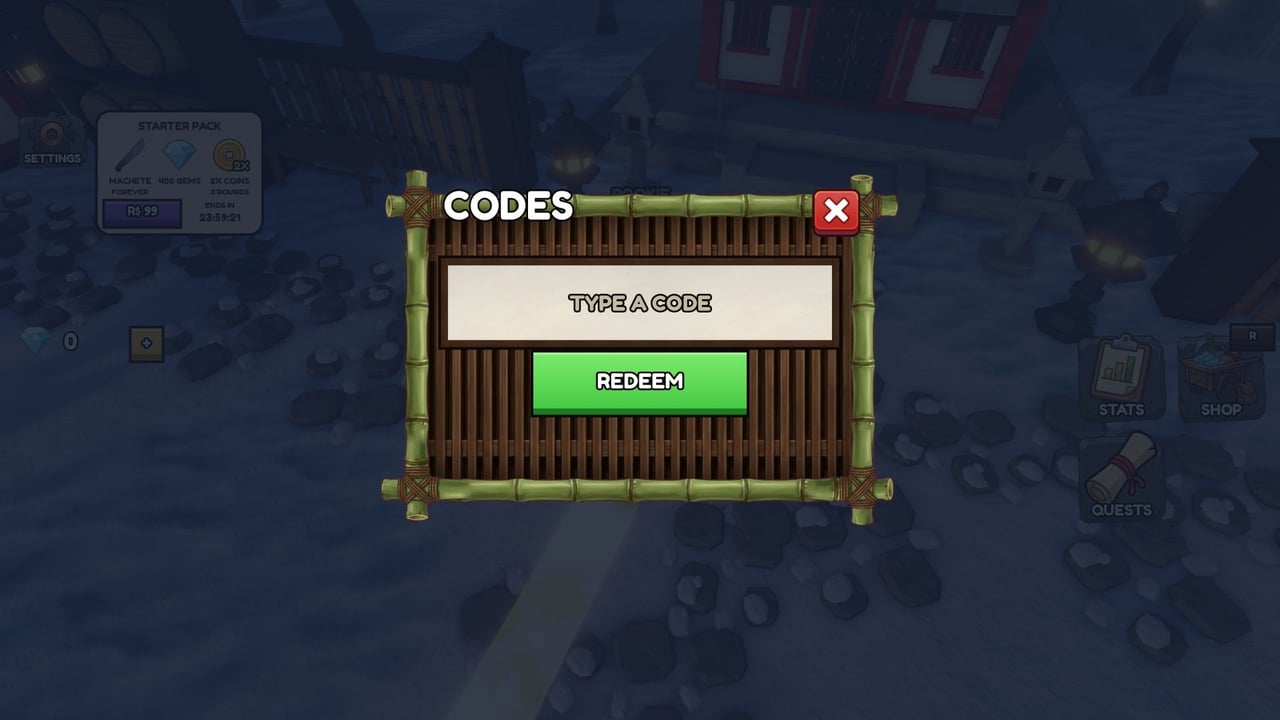
Redeeming Clear Bamboo codes takes under a minute once you know where the lobby panel lives. This guide walks through the official flow used in Takemura Onsen Co.’s Roblox simulation, explains what success looks like on-screen, and covers the common reasons a code fails so you do not waste a timed boost window staring at an error. A verified CLEAR BAMBOO CODES walkthrough video is embedded mid-article for visual learners.
As of late November 2026, the experience sits near 672k+ visits with roughly 8.1k favorites, and ONSEN is still the only active code we track. Clear Bamboo’s economy mixes coins from successful timed runs with Gems spent in the lobby on Classes and Perks. ONSEN grants 150 Gems + 2x Win Reward for 1h 30m — redeem in the lobby before you start a run so the multiplier applies to the clears you are about to play.
Before you redeem checklist
- Launch Clear Bamboo and finish loading into the lobby (not mid-run).
- Confirm you are on the correct account if you share a device.
- Have the code copied in uppercase exactly as listed on the codes hub — currently
ONSEN. - Plan what you will do during any timed reward (tool upgrades, panda-assisted farming, tornado lanes, or hot-spring pushes).
If you are brand new, skim Getting Started and controls so gem spends and the first-hour upgrade path make sense after redeeming. Spend theory: gems guide.
Step-by-step: redeem in the lobby
- Enter the lobby. Wait until UI elements finish loading. The Codes control sits on the left side of the lobby interface.
- Open Codes. Tap or click the Codes button on the left.
- Choose TYPE A CODE. Select the option labeled TYPE A CODE so the text field appears.
- Enter the promo. Paste or carefully type the code. Avoid leading or trailing spaces.
- Press REDEEM. Submit with the REDEEM button and wait for confirmation.
- Verify rewards. Check that Gems increased and that any active boost (such as 2x Win Reward) shows its remaining duration before you queue a timed bamboo run.
That is the entire official path: Codes (left) → TYPE A CODE → REDEEM. There is no separate website redeem portal for these promos—everything happens in-experience.
What you should receive from ONSEN
When ONSEN is active and unused on your account, a successful redeem grants:
- 150 Gems added to your lobby currency for Classes and Perks.
- 2x Win Reward for 1 hour 30 minutes, doubling win payouts during that window.
Spend gems with a plan. Early cutting power and movement speed usually beat niche sell bonuses while you are still learning bundle routes. Cross-check classes tier guidance, the classes deep dive, and the perks page. Convert boosted wins into tools and bag upgrades using tools and upgrades and the tools hub checklists.
Troubleshooting failed redeems
“Invalid” or no reward
- Re-type the code manually; autocorrect sometimes lowercases or inserts spaces.
- Confirm the code is still listed as Active on the codes hub — ONSEN remains the late-November 2026 active entry until we mark otherwise.
- Leave the Codes panel, wait a few seconds, and try once more after lobby replication catches up.
Already redeemed
Most Clear Bamboo promos are one claim per account. If you redeemed ONSEN earlier, you will not receive a second 150 Gems or a fresh 2x timer from the same code. Check your gem balance and any boost timers instead of spamming REDEEM.
Wrong place in the UI
Players sometimes open shop or class menus looking for a redeem box. Return to the main lobby view and use the left-side Codes button specifically. If your screen resolution crops the left edge, try windowed mode or a higher resolution so the control is visible — more UI notes on controls.
Redeemed but boost “feels” inactive
Timed 2x Win Reward multiplies win rewards, not every cosmetic or unrelated shop price. Start a full run: chop bamboo, fill the bag, bundle at posts, and sell before the timer. Compare coin results to a normal clear. Also ensure you are not confusing win multipliers with panda collection bonuses from Update 2: Pandas.
Playing with friends
Server size goes up to 24 players, and runs save for solo or group play. Codes do not share across the server. Each friend opens Codes on their own client and redeems. Align your 2x windows if you want everyone boosted on the same session block.
Where to find new Clear Bamboo codes
New codes usually appear around major content drops, visit milestones, or community events. Reliable places to watch:
- This wiki’s Codes Hub (we update active and expired tables here first).
- The community Discord invite and Discord and group guide covering Takemura Onsen Co. (~20k+ members).
- Patch write-ups on the updates hub, Update 2: Pandas, and roadmap chapters when “new chapters are on the way” turns into a promo.
Ignore lists that recycle codes from unrelated simulators or paste “working 2024” junk. Clear Bamboo released around 7 October 2026; older unrelated Roblox code dumps will not apply.
After you redeem: make the window count
A redeem only helps if you convert it into better runs:
- Buy or equip the next tool rung if coins allow — see tools tier list.
- Raise bag capacity and cutting power so each trip carries more bamboo.
- If pandas are available, enable helpers so they collect while you route bundles — pandas guide.
- Practice timer discipline with beat the timer and controlled casts from the tornado guide.
- Push forest routes toward the lost village hot spring when your kit can support longer loops.
Avoid burning the entire 2x window in the lobby rearranging cosmetics. Queue the run, keep bundle posts on a short path, and sell with time to spare. If you prefer structured checklists over prose, use the tools hub first-hour and code checklists as a companion to this page.
Safety notes
Never enter Clear Bamboo codes on third-party websites that ask for your Roblox password. The only redeem UI you need is the in-game Codes panel. Be careful with “auto redeem” executors advertised alongside scripts; as of late November 2026 there are still no verified Clear Bamboo scripts on ScriptBlox-style hosts — read the scripts hub before installing anything that touches your client.
Related pages
- Codes Hub — active table and reward explanations
- Getting Started — first session after claiming freebies
- Gems guide — spend the 150 intelligently
- Tools Hub — upgrade priority and code checklist
- Guides Hub — full tutorial map
Redeem carefully, verify the reward UI, then spend the boost on deliberate clears. That habit alone separates players who “tried a code once” from players who actually climb the tool ladder and reach the hot spring with time left on the clock.
Frequently Asked Questions
Quick answers about codes, tools, pandas, and the hot spring.
Where is the Codes button in Clear Bamboo?
On the left side of the lobby UI. Open it, choose TYPE A CODE, enter the promo, and press REDEEM.
Why does my Clear Bamboo code say invalid?
Check spelling and spaces, confirm the code is still active on the codes hub, and retry after a short lobby wait. Expired or already-claimed codes will not grant rewards again.
Do I redeem codes during a run or in the lobby?
Redeem in the lobby before starting a timed run so gem grants and win multipliers are active for the session you are about to play.
Can I redeem the same code on multiple accounts?
Each Roblox account can typically claim a promo once. Alt accounts must redeem separately; codes do not transfer by standing in the same server.
Where are new Clear Bamboo codes announced?
Watch this wiki’s codes hub, the community Discord, and update notes from Takemura Onsen Co. We mark codes active or expired as soon as they are verified.